
How to Improve Your LinkedIn Visibility as a Job Seeker in 2026

In today's hyper-competitive job market, your LinkedIn profile is your digital first impression. Recruiters make hiring decisions within seconds of viewing a profile — and if yours isn't optimised, it simply won't appear in their search results. This guide gives you a complete, step-by-step roadmap to dramatically improve your LinkedIn visibility as a job seeker in 2026, covering everything from ATS-friendly profile structure to content engagement strategies that keep you on every recruiter's radar.
1. Perform a Full LinkedIn Profile Audit First
Before adding anything new, audit what's already there. Open your profile and switch to "Public view" — this is exactly what recruiters and hiring managers see. Ask yourself: does this profile instantly communicate my value, my expertise, and my target role? If not, the following sections will fix that.
Key Areas to Audit Immediately
- Profile photo: professional headshot with a clean background (no selfies, no group photos)
- Banner image: branded header relevant to your industry or target role
- Headline: does it contain your target job title and primary skill keywords?
- About section: is it written in first person? Does it open with a strong hook in the first 2 lines?
- Custom LinkedIn URL: is it set to linkedin.com/in/your-full-name?
- Contact info: email, website, and location are filled in and correct
- All-Star profile status: have you completed every major section?
2. Write an ATS-Optimised LinkedIn Headline
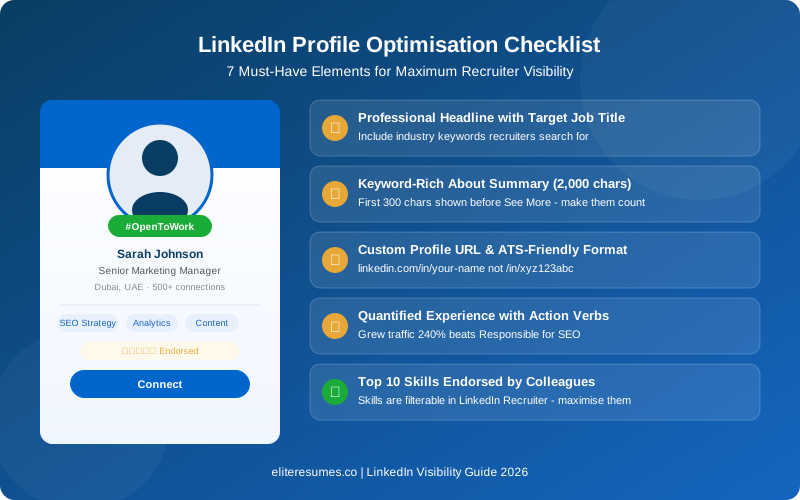
Your LinkedIn headline is the single most powerful piece of real estate on your profile. It appears in search results, recruiter tools, connection requests, and comment sections. The default headline LinkedIn sets — your current job title — is almost never optimal for a job seeker.
The ATS-Friendly Headline Formula
❌ Weak: "Marketing Professional at XYZ Corp"
✅ Strong: "Senior Digital Marketing Manager | SEO · Paid Media · Growth Strategy | Open to Global Roles"
LinkedIn allows 220 characters in the headline. Use every character. Include your primary keyword early — LinkedIn's algorithm weighs the beginning of your headline more heavily in search ranking.
Target Keywords for Your Industry
Research what terms recruiters actually search by looking at 10–15 job descriptions for your target role and noting repeated phrases. Common high-value keywords include:
Pro Tip: Use the exact job title from postings you are targeting. If every posting says "Customer Success Manager" but you've written "Client Relations Lead," LinkedIn's algorithm won't rank you for those recruiter searches — even if your experience is identical.
3. Write a Keyword-Rich "About" Summary that Converts
The "About" section is your opportunity to tell a compelling career story — and to pack in the keywords that push your profile up in LinkedIn Recruiter search. Here is the structure that consistently performs best:
Open with your biggest career achievement or your professional identity. This must hook the reader before they click "See more."
📌 Paragraph 1 (The Value Proposition):
What do you do, for whom, and what measurable results do you deliver? Include industry keywords naturally.
📌 Paragraph 2 (Skills & Expertise):
A short, readable list of your top 8–10 skills. This is prime keyword territory for LinkedIn's search algorithm.
📌 Closing (The Call to Action):
End with: "Currently open to [role type] opportunities in [location/remote]. Feel free to connect or message me directly at [email]."
4. Structure Your Experience Section for Maximum ATS Impact
Most job seekers write job descriptions that read like a duty roster. Recruiters and ATS algorithms scan for quantified achievements and industry-specific keywords — not vague responsibilities.
Before vs. After: Transforming Your Experience Bullets
"Responsible for managing the social media accounts and creating content."
✅ Strong (ATS & recruiter-ready):
"Managed LinkedIn, Instagram, and X content strategy for 3 brands, growing combined following by 85K followers and increasing lead generation by 142% YoY through targeted campaigns."
The rule is simple: every bullet point should answer "So what?" If there is no result, metric, or impact — rewrite it until there is. Use powerful action verbs: Scaled, Drove, Spearheaded, Reduced, Generated, Launched, Optimised, Led, Negotiated, Delivered.
Pro Tip: Mirror the language from your target job descriptions in your experience section. If three postings all say "cross-functional collaboration," use that exact phrase — not a synonym like "interdepartmental teamwork." ATS keyword matching is literal.
5. Optimise Your Skills Section — It Controls Recruiter Filters
LinkedIn Recruiter allows hiring managers to filter candidates by skills. If you don't have the right skills listed, you will be invisible to filtered searches — regardless of how good your experience is. LinkedIn allows up to 50 skills, and you should use all of them.
How to Prioritise Your Skills
- Put your top 3 most important skills first — these appear below your headline in search results.
- Analyse 10–15 job descriptions for your target role and list every repeated skill.
- Request endorsements from at least 5–10 connections for your top skills — endorsed skills rank higher in search.
- Take LinkedIn Skill Assessments to earn the "Verified" badge — this adds a visual trust signal to your profile.
- Remove outdated or irrelevant skills that dilute your profile's focus.
6. Build a Strategic LinkedIn Network That Opens Doors
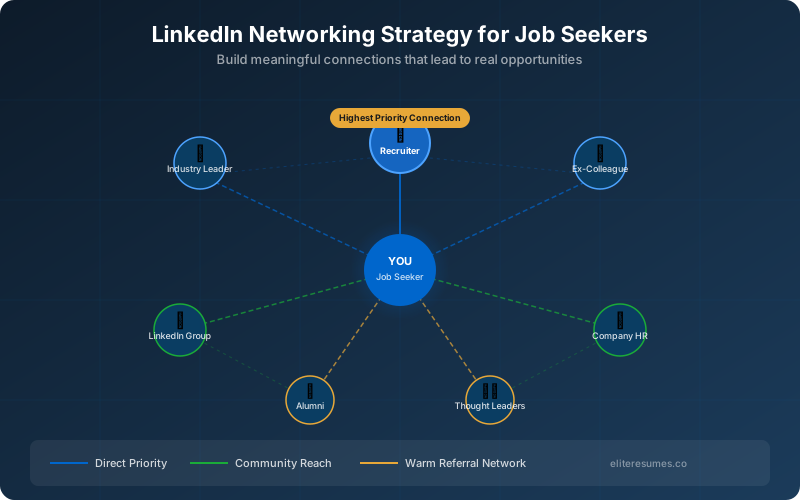
LinkedIn's algorithm rewards profiles with larger, more engaged networks. Critically, who you are connected to affects which recruiter searches you appear in — because LinkedIn's first-degree, second-degree and third-degree connections influence search visibility and results.
Networking Strategies That Actually Work
Personalise Every Connection Request
Never send the default "I'd like to connect" message. Write a short, specific personalised note — referencing a post they wrote, a mutual connection, or a specific reason you admire their work. A personalised request is 5× more likely to be accepted.
"Hi [Name], I really valued your recent post on [topic] — your insight on [specific point] resonated with my own experience in [industry]. I'd love to connect and follow your work. — [Your Name]"
Engage with Recruiters Before Applying
Follow and meaningfully engage with recruiters from companies you're targeting at least 2–3 weeks before sending your application. Comment thoughtfully on their posts, share their insights, and connect. By the time your application lands on their screen, they will already recognise your name.
Join and Participate in Industry LinkedIn Groups
LinkedIn Groups extend your reach beyond your direct connections. When you comment in a group, your profile becomes visible to all group members — exponentially growing your audience. Join 5–10 active groups in your sector and contribute value weekly, not just job-seeking requests.
Pro Tip: Click "Follow" on the company pages of your 20 most-targeted employers. Like and comment on their posts regularly. LinkedIn's algorithm shows your activity to your network — keeping you visible and positioning you as someone already invested in their brand.
7. Use Content to Stay Visible Between Applications
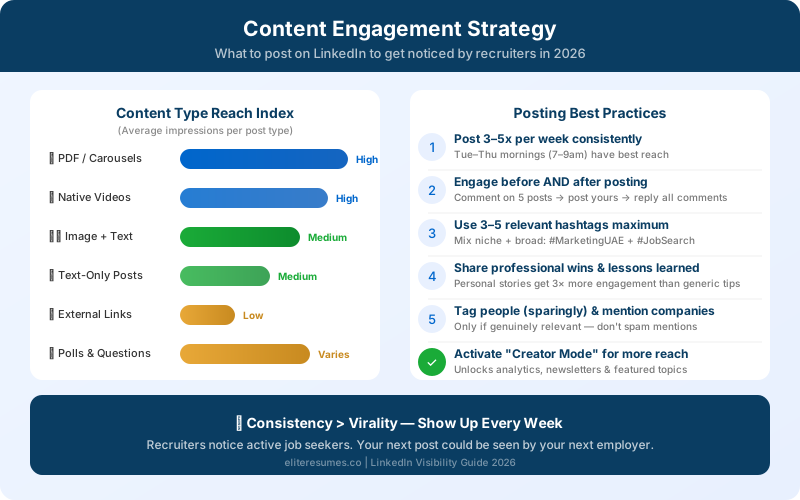
The single most underused strategy by job seekers is consistent content creation. Posting and engaging on LinkedIn signals to the algorithm that you are an active professional — which boosts your appearance in searches and in your connections' feeds. Recruiters notice who shows up consistently in their feed before they ever get a formal application.
What to Post as a Job Seeker
- Professional lessons learned: Share a mistake you made in your career and what it taught you. Authenticity generates far higher engagement than generic tips.
- Industry insights: Comment on trends, news, or changes in your field. This positions you as a knowledgeable professional, not just a job applicant.
- A project or achievement breakdown: "Here's a challenge I solved at [company] — and how I did it." This is a live portfolio piece that recruiters love.
- Your job search update (done tastefully): A single well-written post about being open to opportunities can generate dozens of recruiter messages in 48 hours.
8. Activate the "Open to Work" Feature Strategically
LinkedIn's Open to Work feature is one of the platform's most powerful visibility tools for job seekers — yet it is frequently misused. Used correctly, it can generate an immediate surge in recruiter messages.
Two Modes: "All LinkedIn Members" vs. "Recruiters Only"
Maximum visibility. The #OpenToWork frame appears on your profile photo. Best if you are comfortable with your current employer knowing you are job hunting — or if you are not currently employed.
🔒 "Recruiters Only" (private):
Hidden from the general public and from employees at your current company. LinkedIn uses best-effort detection to hide it, but this is not a foolproof guarantee. Best if you are currently employed and need discretion.
Whichever mode you choose, fill in all the target job titles, preferred locations, employment types, and start date. LinkedIn uses these preferences to recommend your profile to recruiters running relevant searches.
Pro Tip: Add multiple job title variations in the Open to Work settings. If you're a "Product Manager," also add "Senior Product Manager," "Product Lead," and "Group Product Manager." Recruiters search by title — casting a wider net dramatically increases inbound visibility.
9. Common LinkedIn Mistakes That Destroy Recruiter Visibility
Even a well-intentioned profile can be self-sabotaging if these common pitfalls are present:
- Incomplete profile: LinkedIn only gives "All-Star" status — and full search visibility — to 100%-complete profiles. Missing sections hurt your ranking.
- No profile photo: Profiles with photos receive 21× more views. A missing photo is a red flag that suggests an abandoned or fake profile.
- Using first-person sparingly in the About section: Write as YOU, not as a corporate bio. "I led a team of 15..." is more compelling than "Alex led a team of 15..."
- Not updating your profile URL: The default URL is a random string. Customise it to linkedin.com/in/firstname-lastname — it looks professional and is easier for recruiters to share.
- Endorsing others without being endorsed back: Be strategic — proactively endorse connections for skills you genuinely know they have. Most will reciprocate.
- Ignoring the "Featured" section: This is a visual portfolio space. Pin your best work: a presentation, a published article, a case study PDF, or a media mention.
- Spelling and grammar errors: Use Grammarly or a second reader. Recruiter perception drops sharply at the first typo.
10. Tailor Your LinkedIn Profile for Your Target Industry
A general LinkedIn profile trying to appeal to everyone will ultimately appeal to no one. ATS tools and LinkedIn's own algorithm both favour profiles that are clearly aligned to a specific role and sector. Here's how to customise by industry:
💻 Tech & Engineering: List your tech stack as individual skills. Include GitHub links in your featured section. Mention Agile, DevOps, CI/CD, and cloud platforms explicitly.
📈 Marketing & Growth: Front-load ROI metrics and channel-specific achievements. Name the tools you use (HubSpot, GA4, Salesforce). Include a portfolio link.
⚕️ Healthcare & Life Sciences: Note your licensure status, specialisations, and clinical settings. Use clinical abbreviations your recruiters will search for.
🏗️ Engineering & Construction: Highlight project scale (budget, team size, duration), certifications (PMP, LEED, MEP), and geographic regions of operation.
11. Is LinkedIn Premium Worth It for Job Seekers?
LinkedIn Premium Career (the job-seeker tier) offers several features that can accelerate your search:
- InMail messages: Contact recruiters directly, even without a connection — powerful for cold outreach.
- "Who viewed your profile": See the last 365 days of profile viewers (vs. 5 days on free). Use this to identify and reach out to recruiters who've already shown interest.
- Featured Applicant status: Your application is moved to the top of the pile when you apply through LinkedIn job posts.
- Salary insights: Access market pay data so you negotiate from a position of knowledge.
- LinkedIn Learning: Unlimited access to courses that add certifications to your profile.
Premium is not mandatory — but if you are actively job searching and in a competitive field, the ROI on a single InMail that lands an interview far exceeds the monthly subscription cost.
For more expert career guidance, explore our complete guide on getting noticed on Bayt for UAE employers and our essential resume tips for 2025–2026.
Frequently Asked Questions: LinkedIn Visibility for Job Seekers
Ready to Get Noticed by Top Recruiters?
Let our expert team craft an ATS-optimised resume and LinkedIn profile that puts you in front of the right hiring managers — faster.